Invoicing software for freelancers and small teams in Germany

Create invoices without the busywork.From quote to paid e-invoice.

Create quotes, invoices and German e-invoices in minutes. Fakturen keeps customers, numbering and every related document connected - from quote to payment.

No account is needed for the quick generator. Plus and Pro trials require payment details at the start.

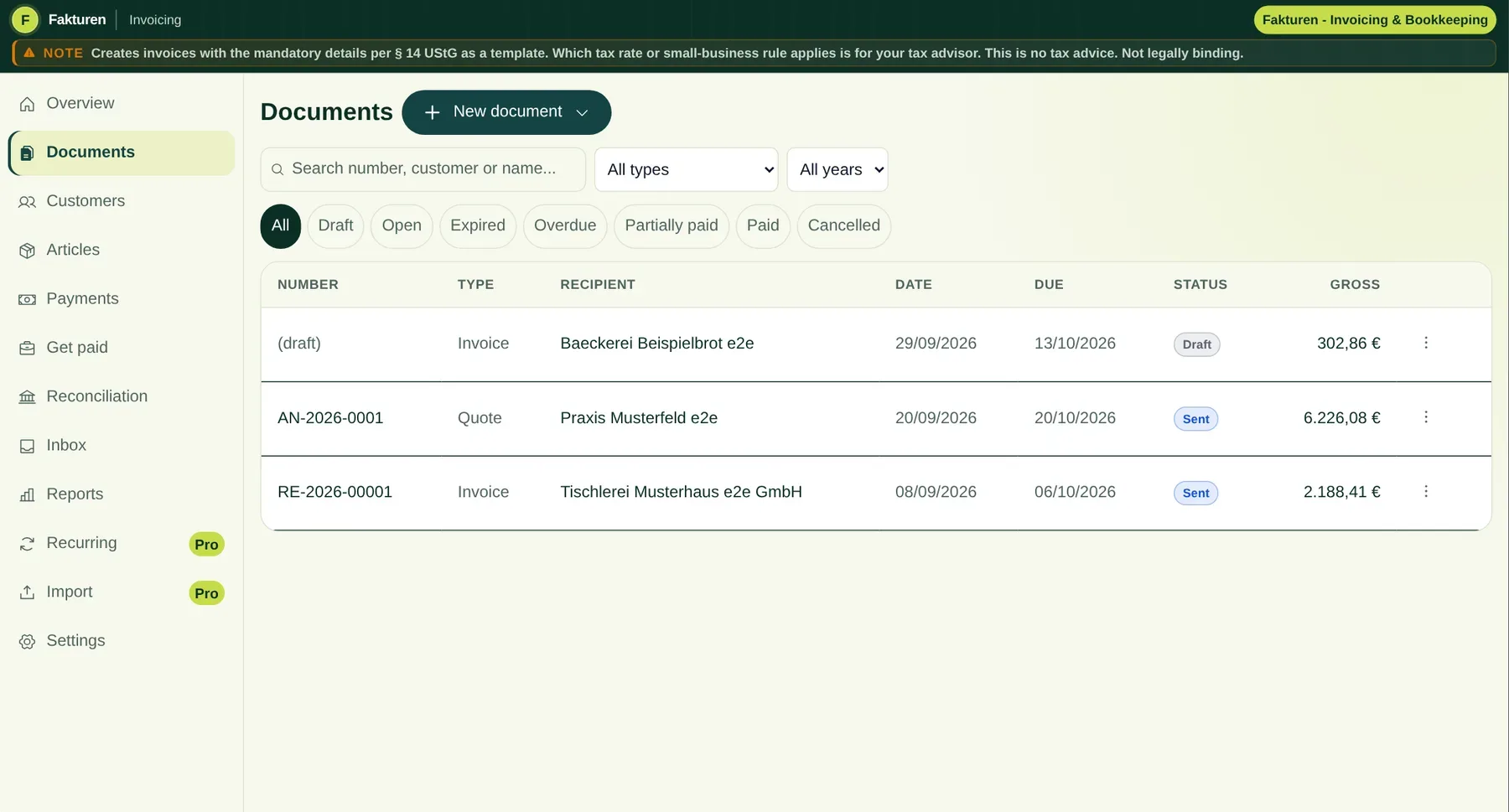
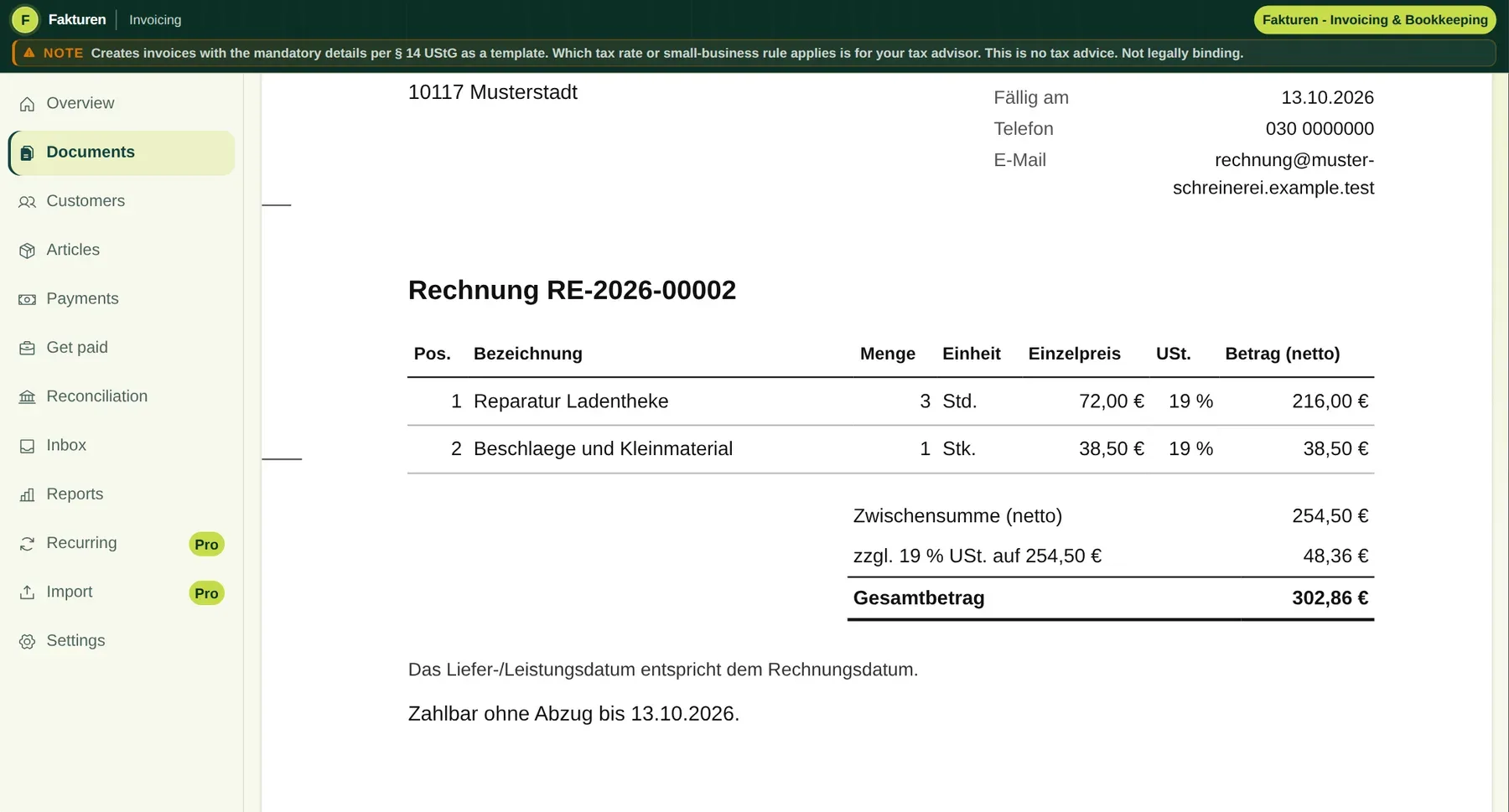
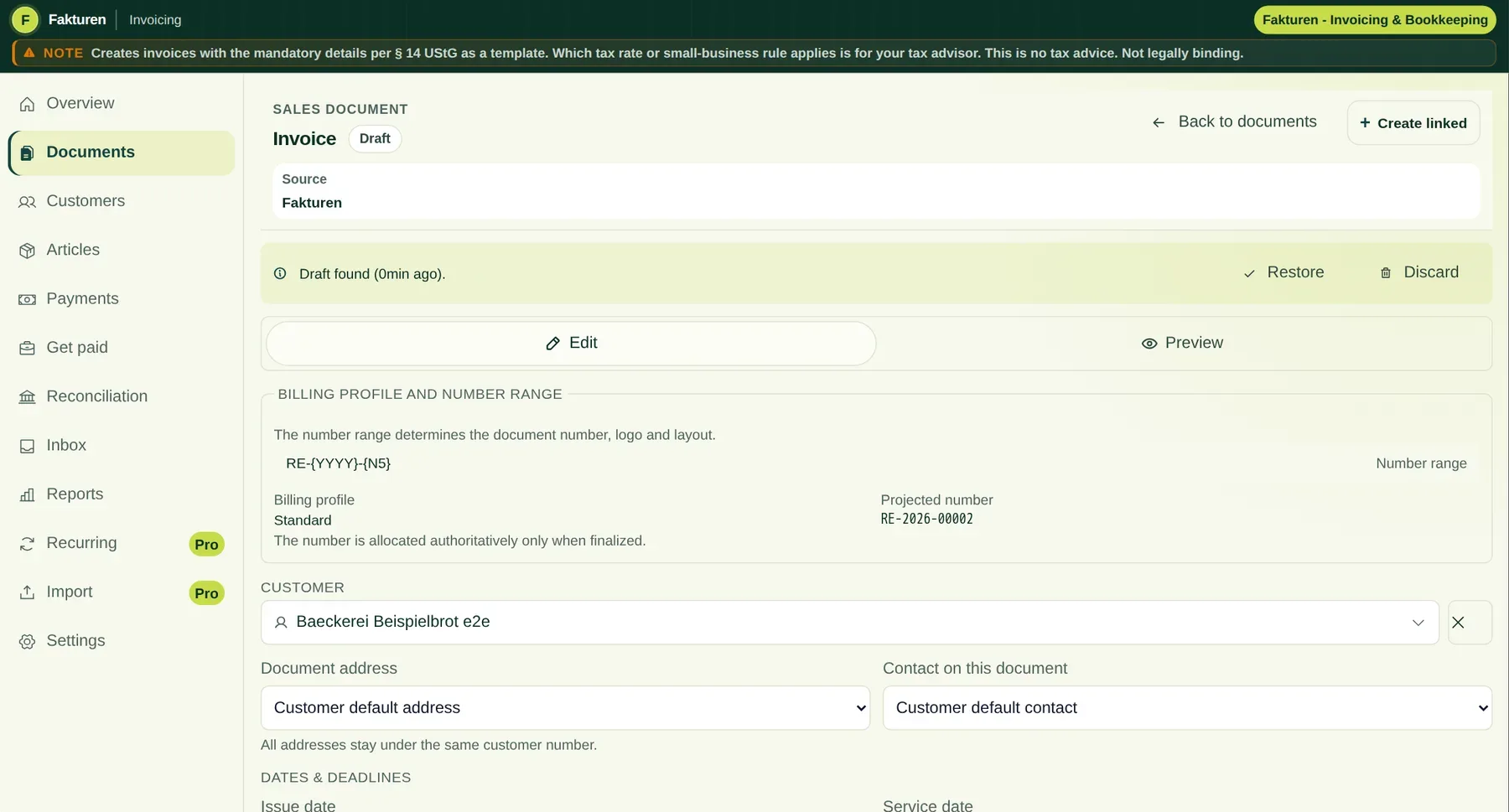
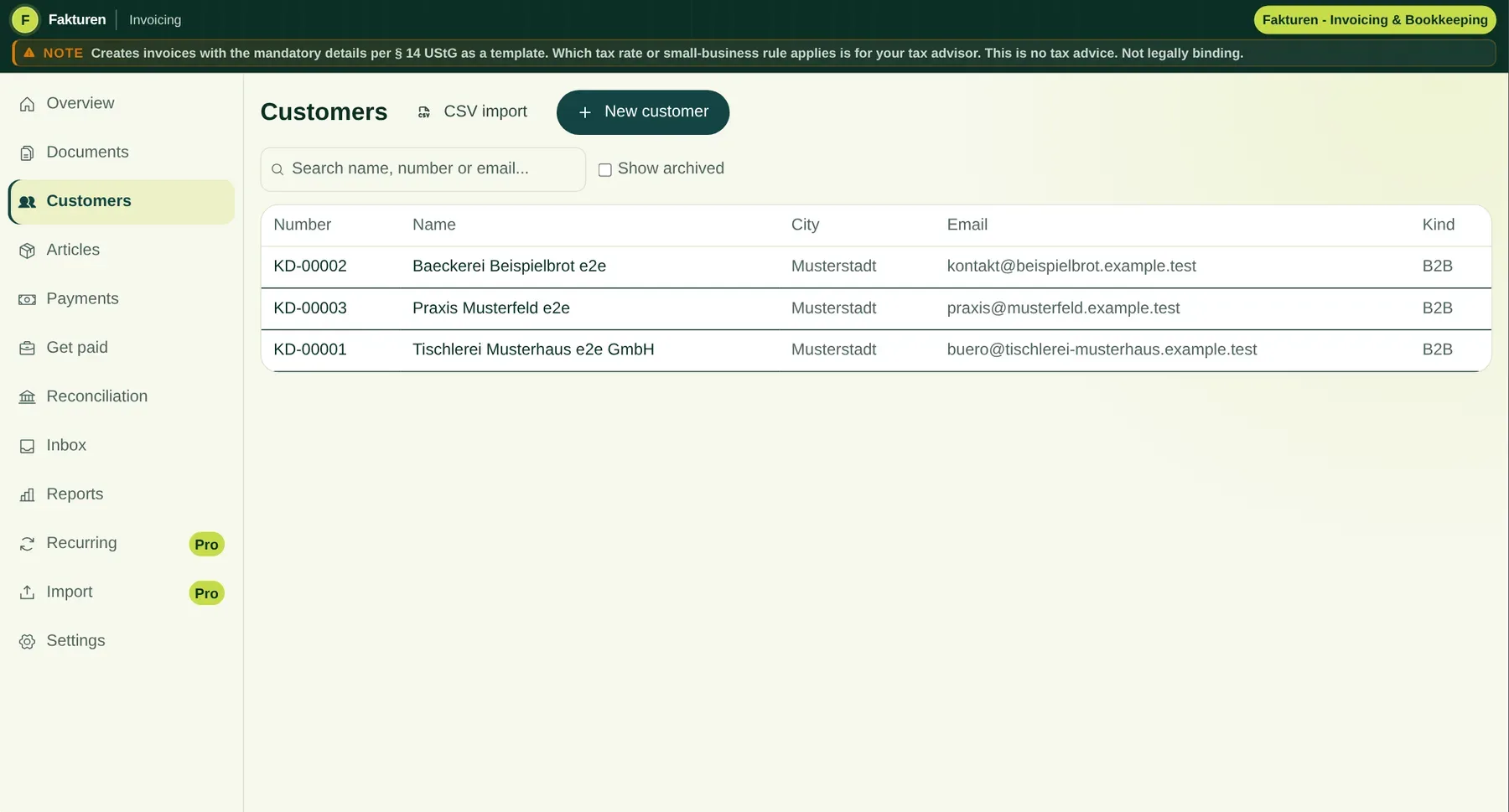
Real Fakturen interface, shown in German
Fakturen workspace showing an invoice with synthetic sample data
Draft createdInvoice sentPayment confirmed
The shipped application, shown in German with synthetic sample data. Fakturen also supports English. Try the interactive English invoice below.
  • 14Try it for 14 daysFirst regular subscription payment afterwards
  • DEOperated in GermanyHetzner NBG1 location in Germany
  • EGerman e-invoicing built inXRechnung and ZUGFeRD
  • +One subscription for all toolsInvoices, projects, HR and more
Does this sound familiar?

The invoice should not take longer than the work behind it.

Fakturen fixes the three places where small businesses lose time every month.

01

Open an old Word file, copy the last invoice and hope the number and required details are right.

Fakturen insteadSet up customers, products, numbering and issuer details once, then reuse them.
02

The quote, delivery note and invoice live as separate files with the same information typed again.

Fakturen insteadContinue the same transaction. Items, recipient details and terms move forward with it.
03

Open invoices, incoming payments and reminders live in spreadsheets, inboxes and memory.

Fakturen insteadFakturen brings them into one view. You confirm payment matches yourself; you prepare reminders manually or explicitly automate them in Pro.
One transaction instead of many files

From quote to payment without entering everything twice.

Each step knows the previous one. You carry the data forward, check the result and decide when anything is finalised, sent or matched.

01

Quote

Enter the customer, work, price and terms once.

02

Order and delivery

Turn it into an order confirmation and delivery note.

03

Invoice

Finish a standard, advance, partial or final invoice.

04

Payment

Import a CSV, review the suggestion and confirm the match.

05

Afterwards

Send a reminder or export data for your tax adviser when needed.

Nothing happens behind your back. Drafts remain editable. Finalised documents are not silently overwritten. Cancellations and credit notes stay linked to their source.

Also included: Projektspiegel

Move project work directly into invoicing.

Projektspiegel keeps client work, tasks, time and budgets together. Billable work arrives in Fakturen as a draft for you to review, instead of being copied from a spreadsheet.

Project management is included in your Werkzeu.ge Plus or Pro subscription.

Explore project management
Do not take our word for it

Change the invoice yourself.

This live renderer uses the same document view as Fakturen. Change the recipient, line items or VAT rate and see the invoice update immediately. Sample data only, with no upload.

This example is interactive
Fakturen.deInvoicing suitePRO
Synthetic Pro draft - browser onlyNot connected to production data

Recipient

Line items

Net4.300,00 €
VAT817,00 €
Total5.117,00 €
E-INVOICEZUGFeRD (EN 16931)

Live preview

Final PDF is checked by the server

Changes update the shipped Pro preview renderer immediately. Nothing is saved or sent to an account.

What matters day to day

Four jobs. One calm workflow.

The simple view stays simple. The technical details are available when you or your tax adviser need them.

01

Create and send

Customers, products and documents stay connected. Your logo, a live preview, PDF output, SMTP delivery and an optional Girocode are built in.

  • Quote through to final invoice
  • Multiple addresses and contacts per customer
  • Customer portal and optional payment link
Technical details

Final documents freeze the chosen recipient and issuer presentation. Finalisation, an audit trail and a SHA-256 checksum support traceable record keeping. The final document number is assigned only when you finalise the document.

02

Create and receive German e-invoices

Fakturen creates German e-invoices and reads structured incoming invoices. An ordinary scanned PDF is treated only as editable OCR assistance.

  • XRechnung 3.0 using CII syntax
  • ZUGFeRD/Factur-X with the EN 16931 profile
  • Read CII, UBL 2.1 and embedded ZUGFeRD
Technical details

Technical checks help detect format and required-field errors. They do not guarantee acceptance by the recipient or recognition for tax purposes. You must check the requirements of the specific recipient.

03

Match payments without giving up control

Import settlement lists from the portals you already use. Fakturen suggests likely invoices. Nothing is posted until you confirm it.

  • CSV from banks, PayPal, Mollie and Stripe
  • Duplicate rows are detected
  • Split one payment across several invoices
Technical details

There is no direct bank feed or write access to your account. Matching is separated by organisation and currency. A suggestion alone never creates a payment.

04

Hand over clean data

With Pro, finalised invoices can be exported as a DATEV-format booking batch for further work by you or your tax adviser.

  • EXTF 700 booking batch
  • SKR 03 or SKR 04
  • Data export and GDPR access
Technical details

Fakturen does not create a payment booking batch and does not provide a direct DATEV connection. Account assignment, bookkeeping, tax returns and year-end work remain with you and your tax adviser.

Also included: Personarium

HR belongs in the business, not in another disconnected tool.

Manage personnel files, leave, time tracking and employee documents in Personarium with the same Werkzeu.ge account. Pro also adds shift planning.

Core Personarium features, leave and time tracking are included in Plus. Shift planning, shared organisations and employee self-service require Pro; additional users require purchased team seats.

Explore HR tools
E-invoicing in Germany

What changes when, in plain English.

These rules mainly concern taxable transactions between businesses established in Germany. Exceptions and the requirements of the specific recipient still matter.

Updated: August 2026
  1. 2025

    Be able to receive

    Since 1 January 2025, businesses established in Germany must be able to receive e-invoices. An email inbox is generally sufficient. An ordinary PDF is not an e-invoice.

  2. 2026

    General transition period

    For transactions covered by the new domestic B2B rule, issuers may continue to use paper or, with the recipient's consent, ordinary PDFs until 31 December 2026.

  3. 2027

    More time for smaller businesses

    If the issuer's prior-year revenue is no more than EUR 800,000, this transition continues until 31 December 2027.

  4. 2028

    Generally mandatory

    After the transition periods end, an e-invoice is generally required for transactions between businesses established in Germany unless a statutory exception applies.

Important for businesses applying the German Kleinunternehmer scheme: they must be able to receive e-invoices, but are exempt from having to issue them. Small-value invoices up to EUR 250 gross and tickets may also be issued as other invoices.

PDF or e-invoice?

An ordinary PDF does not contain the structured invoice data required for an e-invoice. An e-invoice contains structured data that software can process directly. ZUGFeRD combines a readable PDF presentation with embedded invoice data.

Check the current rules at the German Federal Ministry of Finance
Pro: invoice profiles

One legal entity. Several business units. Clearly separated.

Each business unit can use its own logo, document style and number ranges. The legal issuer, tax details and bank account remain central. Profiles are intended for units of the same legal entity, not separate companies.

Business Unit AlphaOwn logo, classic layoutINV-A-2026-001
Business Unit BetaOwn logo, warm accent colourINV-B-2026-001
ConsultingOwn logo, modern layoutINV-C-2026-001
Maintained centrallyCompany address, legal issuer, tax details and bank account
Start without starting over

Bring your data in. Take it out whenever you want.

Fakturen does not make you begin from zero and does not build a cage around your data.

Bring existing data with you

Import customers and products from CSV with visible column mapping. Pro also creates new invoice drafts through a reviewed CSV batch import.

  • Up to 1,000 customers or products per import
  • Up to 500 new invoice drafts per CSV batch with Pro
  • Preview before importing

Personal help from 5 team seats

We enter your customer and product data at no charge, so your team does not spend its first day sorting spreadsheets.

Free data setup from 5 seats
Included in the same subscription

Invoicing, projects and HR. One subscription.

Plus and Pro cover Werkzeu.ge as a whole. Fakturen is not an isolated invoice module. The matching workspaces for projects, HR and files are included in the same subscription.

One account, one price, connected workspaces
Invoicing

Fakturen

Customers, quotes, invoices, incoming payments and clean handover to your tax adviser.

  • Shared customer records
  • E-invoicing and incoming invoices
  • Payments and reminders
Explore Fakturen
Projects and customers

Projektspiegel

Plan client work, tasks, time and budgets. Billable work becomes a draft in Fakturen for you to check.

  • Kanban and tasks
  • Time, budgets and workload
  • Invoice drafts without duplicate entry
Explore project management
People

Personarium

Organise personnel files, leave, time and documents in the same Werkzeu.ge account. Shift planning is a Pro feature.

  • Personnel files and documents
  • Leave and time with Plus, shift planning with Pro
  • Self-service with Pro and team seats
Explore HR tools
Files

File cabinet (Aktenschrank)

Keep final invoices, incoming documents, project files and HR documents in an organised file cabinet.

  • Folders instead of download chaos
  • Connected to invoicing, projects and HR
  • Download, export and controlled deletion
Learn about Werkzeu.ge

Important for teams: Shared organisation use and employee self-service require Pro and purchased team seats. Personal use follows the features of your Plus or Pro plan.

Clear pricing

One Werkzeu.ge subscription. No price per module.

Choose how you work: Plus for a connected solo workflow, Pro for advanced workflows, or Pro Team for a shared organisation.

One invoice for free

Quick PDF generator with no account. Your entries are not sent to Werkzeu.ge; the draft, sender profile and invoice counter may be stored locally in your browser.

Start free
For one person with advanced workflows

Pro Solo

Gold founder price - 46% off

Everything in Plus, plus automation, DATEV-format export and every Pro tool.

€13.99 / monthregularly €25.99

Annual plan: 12 months for the price of 10: €139.90

  • Recurring invoices
  • Dunning automation you explicitly enable
  • DATEV-format export
  • New invoice drafts through CSV batch import
  • Every Pro tool for projects and HR
  • Multiple invoice profiles with their own logo, design and number range
Try Pro for 14 days

The monthly plan can be cancelled monthly. You keep this founder price while the subscription remains uninterrupted. 31 days remain in the Gold phase, then the price rises.

For working together

Pro Team

Gold founder price - 46% off

Everything in Pro, shared with customers, documents, roles and invitations.

€13.99 / month per purchased seatregularly €25.99
  • Organisation and roles
  • Invitations by email
  • Price per purchased team seat
  • Free data setup from 5 seats

2-500

Monthly team total€41.97 / month
Annual team total12 months for the price of 10€419.70 / year
Try Pro Team for 14 days

The monthly plan can be cancelled monthly. You keep this founder price while the subscription remains uninterrupted. 31 days remain in the Gold phase, then the price rises.

Plus and Pro apply to the whole Werkzeu.ge platform, not only Fakturen.All displayed prices include 19% German VAT. The 14-day trial starts after usable payment details are confirmed. Mollie charges EUR 1.00 immediately as an advance. It is credited against the first subscription payment or refunded if you cancel before conversion. The checkout information is authoritative.
Fits your existing business

Create clean invoices. Pass data on with confidence.

Fakturen handles the invoicing workflow and keeps handovers to accounting, tax advisers and payment processes traceable.

Directly in Fakturen

  • Quotes, invoices and connected document chains
  • Customers, products, incoming invoices and payment matching
  • Reviewable suggestions, exports and traceable finalisation

For further processing

  • Prepare exports for accounting and tax advisers
  • Provide structured e-invoice data
  • Hand over documents and payment statuses clearly
Frequently asked

Clear answers before you buy.

If something is missing, contact us directly through Werkzeu.ge.

Is Fakturen a complete accounting or tax application?

No. Fakturen connects invoicing, customer records, incoming invoices, reminders, payment matching and exports. It does not include tax returns, ELSTER filing, bank access or tax advice. Fakturen prepares data for your tax adviser; it does not replace them.

Which e-invoice formats does Fakturen support?

Fakturen creates XRechnung 3.0 using CII syntax and ZUGFeRD or Factur-X with the EN 16931 profile as a hybrid PDF with embedded XML. It reads CII, UBL 2.1 and embedded ZUGFeRD. Technical checks do not guarantee acceptance or recognition for tax purposes.

Can one company invoice several business units separately?

Yes. Pro invoice profiles give each business unit its own logo, document style and number ranges. The legal issuer, tax details and bank account remain central. This is for units of the same legal entity, not separate companies.

Can one customer have several addresses and contacts?

Yes. One customer number can have any number of billing, delivery, branch and other addresses, plus several contacts. Final documents freeze the selected recipient address as an immutable snapshot.

Does Fakturen connect to my bank and payment providers automatically?

No. You import CSV exports from your bank, PayPal, Mollie, Stripe or card processor. Fakturen detects duplicate rows and suggests matches. A payment is created only after you confirm it.

Will Fakturen automatically send dunning notices?

Only if you explicitly enable “Send automatically” in Pro. Dunning notices are then finalised and emailed without another per-document approval. Alternatively, Fakturen can only notify you or prepare a draft for review. Default interest and the EUR 40 lump sum are calculation aids. Before enabling automation and whenever circumstances change, check that default has legally begun, the debtor is not a consumer and the amounts may be claimed.

How do other team members join?

During team checkout, you set up the organisation and number of seats. After successful activation, invite colleagues by email. They register from the invitation link or sign in with an existing Werkzeu.ge account.

Can I create an invoice without an account?

Yes. The quick generator runs in the browser without sign-in and creates a PDF with an optional Girocode. Your entries are not sent to Werkzeu.ge; the draft, sender profile and invoice counter may be stored locally in your browser. Customer records, document chains, e-invoicing and incoming invoices are part of Plus.

What does the DATEV export contain?

With Pro, finalised invoices can be exported as a DATEV-format booking batch using EXTF 700 for SKR 03 or SKR 04. Fakturen does not create a payment booking batch and does not provide a direct DATEV connection.

How do I bring data in and take it out?

Customers and products can be imported from CSV. With Pro, you can create up to 500 new invoice drafts per CSV batch. Data export and GDPR access remain available. From five team seats, we help transfer customer and product data at no charge.

Where is my data stored?

The core application and primary file storage run on Hetzner infrastructure in the NBG1 location in Germany. Encrypted, geographically separated backups are stored in another Hetzner EU region. Payment and email providers are listed separately in the privacy notice. This product page uses no advertising trackers or optional cookies.
Ready for the next invoice?

Start simply. Connect the rest when you need it.

Create one invoice for free now, or try the connected Fakturen workspace for 14 days.

Already using Werkzeu.ge? Open Fakturen
Complete product guide and technical limitsDocument types, storage, review path and official sources
Product guide and limits

How Fakturen actually works.

Fakturen supports commercial workflows for freelancers and small teams. It does not replace tax advice, review of an individual case or complete financial accounting with tax-return or ELSTER functionality.

About the product previewThe product interface on this page is a direct capture of the shipped application using synthetic sample data. It is not interactive and does not access your Werkzeu.ge account or customer data.

The complete workflow

01

Prepare master data

Set up the legal issuer, number ranges, payment terms, products and customers.

02

Work in drafts

Quotes, order confirmations, delivery notes, invoices, advance and final invoices, credits and cancellations remain editable at first.

03

Check the preview

The live preview shows the recipient, logo, line items, notes, totals and page breaks. The server-generated final file remains authoritative.

04

Finalise and archive

The final number is assigned only on finalisation. Later corrections use a traceable chain of follow-up documents.

05

Review incoming invoices and payments

Structured invoice data is read directly, while OCR remains editable assistance. Payment imports create suggestions only until you confirm them.

What is stored and processed

  • Customers, documents, settings and document chains are stored within an account or organisation on the core infrastructure.
  • Final outgoing documents and incoming originals can be filed in the Aktenschrank.
  • CSV payment lists are read, but Fakturen has no write access to bank accounts.

What Fakturen does not promise

  • A technical e-invoice check is not an acceptance guarantee or a tax review.
  • GoBD-relevant controls support traceable records. Compliance of the complete process also depends on procedures, permissions, backups and procedural documentation.
  • Fakturen does not replace tax advice, legal advice or review of the specific recipient requirements.

Check facts that can change

Current primary sources remain authoritative for specifications, transitional rules and other facts that may change.